
Frontend development is the discipline of building the visible, interactive layer of a website — everything a visitor sees and interacts with in their browser. It encompasses the code and design decisions that produce the layout, typography, colors, animations, buttons, forms, and navigation that make up a web page’s user-facing experience. Frontend developers work primarily in three core technologies: HTML for structure, CSS for presentation, and JavaScript for interactivity.
The term “frontend” contrasts with backend development, which handles the server-side logic, databases, and application processing that users don’t directly see. For most websites, both work together — the backend retrieves and processes data, and the frontend renders it into an experience the visitor can use. In WordPress, PHP (backend) generates the HTML that browsers receive, while CSS and JavaScript handle the visual presentation and interactive behavior in the browser.
The Three Layers of Frontend Development
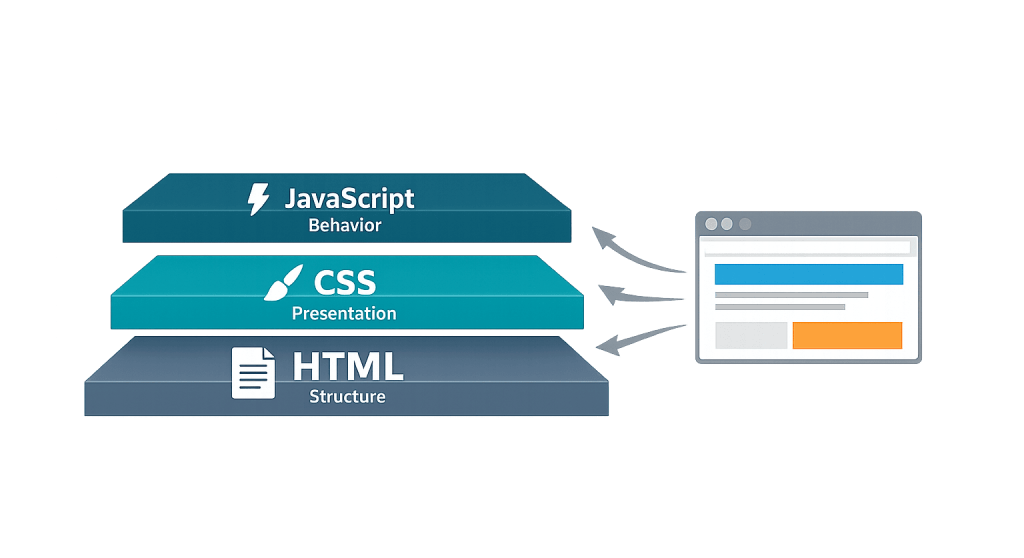
Modern frontend development is built on a clear technology stack:
HTML (HyperText Markup Language) — The structural layer. HTML defines what is on a page: headings, paragraphs, images, links, lists, forms, and buttons. It’s the document skeleton that browsers parse first. Well-structured HTML is also essential for accessibility and search engine understanding.
CSS (Cascading Style Sheets) — The presentation layer. CSS controls how HTML elements look: colors, fonts, spacing, layout (including flexbox and CSS Grid), responsive breakpoints, animations, and more. CSS is what transforms a plain HTML document into a visually designed page.
JavaScript — The behavior layer. JavaScript makes pages interactive and dynamic: dropdown menus, form validation, image sliders, modal windows, AJAX requests that load content without a page refresh, and complex single-page application (SPA) experiences. Modern JavaScript frameworks like React, Vue, and Svelte are also in the frontend domain.
[Image: Diagram showing the three layers — HTML (structure), CSS (presentation), JavaScript (behavior) — stacked and working together to produce a web page]
Purpose & Benefits
1. Directly Shapes the User Experience
Everything a visitor perceives about your website is a frontend concern — the speed at which the page renders, the clarity of the layout, the legibility of the type, the smoothness of interactions. Poor frontend development — slow-loading scripts, inconsistent spacing, broken layouts on mobile — creates friction that drives visitors away. Strong frontend development makes a site feel fast, clear, and professional. This is why frontend quality directly influences conversion rate, bounce rate, and time on site. Our custom WordPress web design always begins with a frontend built for the user’s experience.
2. Determines Accessibility and Compliance
Accessible frontend development — proper HTML semantics, keyboard navigation support, sufficient color contrast, ARIA attributes — ensures that visitors with disabilities can use your site effectively. In practice, this means screen reader users, keyboard-only navigators, and people with low vision can access your content. Beyond the ethical dimension, accessibility affects your SEO (accessible markup is also well-structured for search engines) and, in some contexts, legal compliance. Frontend developers are the ones who implement these standards at the code level.
3. Controls Page Performance and Core Web Vitals
Frontend decisions have an enormous impact on site speed and Core Web Vitals. How CSS is loaded affects render-blocking behavior. How JavaScript is structured affects Interaction to Next Paint (INP). How images are sized and loaded affects Largest Contentful Paint (LCP). A frontend developer who understands performance — code splitting, lazy loading, minification, caching strategies — can dramatically improve a site’s PageSpeed scores. Our WordPress development services treat performance as a first-class concern from the start of every project.
Examples
1. A Responsive Navigation Menu
A business’s website needs a navigation bar that works on both a wide desktop screen and a small phone. The frontend developer writes HTML for the menu items, CSS that displays them as a horizontal bar on large screens and a collapsible hamburger menu on mobile, and JavaScript to handle the open/close toggle on mobile. The result is a single unified navigation system that adapts to any screen size — no separate mobile site, no broken layouts.
2. A Contact Form With Inline Validation
A lead generation form needs to validate user input before submission: required fields, a correctly formatted email address, and a minimum message length. The frontend developer implements HTML5 form attributes for basic validation, JavaScript for real-time feedback as the user types, and CSS for styling the error states (red border, error message below the field). The backend developer handles server-side validation and the actual email delivery — both are necessary, working in complementary layers.
3. A Performance-Optimized WordPress Theme
A WordPress site is slow because the theme loads 15 CSS files and 8 JavaScript files on every page, even pages that don’t use most of those assets. A frontend developer audits the asset loading, consolidates stylesheets, defers non-critical JavaScript using WordPress’s wp_enqueue_scripts system, and implements lazy loading for images. The result is a measurable improvement in PageSpeed scores and faster perceived load times for visitors.
Common Mistakes to Avoid
- Treating mobile as an afterthought — With the majority of web traffic on mobile devices, designing for desktop first and then “fixing” mobile is backwards. A mobile-first approach builds the core layout for small screens and enhances it for larger ones — this is both more technically sound and aligned with how search engines evaluate sites.
- Over-relying on JavaScript for things CSS can handle — Animations, hover states, transitions, and simple show/hide behaviors can often be handled with CSS alone. JavaScript-heavy implementations of these interactions are slower, harder to maintain, and can fail in environments where JavaScript is blocked. Use the right tool for the job.
- Ignoring semantic HTML — Using
<div>elements for everything instead of proper semantic elements (<nav>,<header>,<main>,<article>,<footer>) makes code harder to maintain and misses the accessibility and SEO benefits of meaningful markup. - Loading third-party scripts without performance oversight — Each third-party script (analytics, chat widgets, ad pixels) adds frontend weight and can significantly affect Core Web Vitals. Every external script should be loaded asynchronously or deferred, and the total script weight should be audited regularly.
Best Practices
1. Build for Performance From the Start
Frontend performance isn’t something to bolt on at the end of a project — it’s a discipline applied throughout. Use system fonts or load web fonts efficiently. Keep CSS lean by avoiding unused styles. Defer non-critical JavaScript. Optimize images before they’re uploaded. Set explicit width and height on images to prevent layout shift. The cumulative effect of these decisions is the difference between a site that scores 95 on PageSpeed and one that scores 45.
2. Write Clean, Semantic HTML
Semantic HTML — using the right element for the right job — pays dividends in accessibility, SEO, and maintainability. Use heading elements (h1 through h6) in logical hierarchy, not just for visual size. Use <button> for interactive controls, not styled <div> elements. Use <a> with href for navigation links, not JavaScript-driven click handlers. This creates a document structure that assistive technologies, browsers, and search engines can all understand correctly. Cross-link to related CSS and HTML glossary entries for visitors who want to go deeper.
3. Test Across Devices and Browsers
Frontend code behaves differently across browsers and device types. A layout that looks perfect in Chrome on a MacBook may break in Firefox or on a Samsung Galaxy. Systematic testing — at minimum, checking major browsers (Chrome, Firefox, Safari, Edge) and representative mobile devices — catches rendering inconsistencies before visitors encounter them. Use browser developer tools, device emulators, and real device testing as part of the development workflow, not as a final quality check.
Frequently Asked Questions
What’s the difference between frontend and backend development?
Frontend development produces what users see and interact with in their browser — HTML, CSS, and JavaScript. Backend development handles what happens on the server: processing requests, querying databases, running business logic, and generating the HTML that the frontend displays. Many WordPress sites are “traditional” full-stack: PHP backend renders complete HTML pages that the browser receives and styles with CSS.
Do I need a frontend developer or a web designer?
Both roles exist, and they overlap. A web designer typically focuses on visual design — layout, typography, color, and UX decisions — and may produce designs as mockups. A frontend developer translates those designs into working HTML/CSS/JavaScript code. Many professionals do both. For a business that needs a custom WordPress site, you generally need someone who can do both — or a team where a designer and developer collaborate.
Is WordPress frontend development different from regular web development?
The core technologies are the same — HTML, CSS, and JavaScript. WordPress adds its own layer: PHP templates (or block templates in FSE themes), the WordPress theme structure, hooks and filters for customization, and the block editor’s frontend components. A frontend developer working on WordPress also needs to understand how WordPress enqueues scripts and styles, how the block editor renders in the browser, and how themes are structured.
How does frontend development affect SEO?
Significantly. Page speed (frontend performance) is a ranking signal. Proper HTML structure helps search engines understand content hierarchy. Semantic markup supports rich snippets and schema. Mobile responsiveness is required for Google’s mobile-first indexing. Frontend decisions made during development have direct, measurable SEO consequences — which is why we treat performance and clean markup as part of the development standard on every project.
What are the most important frontend skills for WordPress specifically?
Beyond core HTML/CSS/JavaScript, WordPress frontend development requires understanding the theme file system (or FSE block templates), WordPress’s script/style enqueueing API, the block editor’s markup patterns, and how to use PHP template tags within theme templates. Familiarity with the Customizer, block patterns, and theme.json (for block themes) rounds out the WordPress-specific skill set.
Related Glossary Terms
- Backend Development
- HTML (HyperText Markup Language)
- CSS (Cascading Style Sheets)
- JavaScript
- WordPress Theme
- Core Web Vitals
How CyberOptik Can Help
As a WordPress-focused agency, frontend development is at the core of what we do. Every site we build is handcrafted with clean HTML, optimized CSS, and purposeful JavaScript — built for performance, accessibility, and long-term maintainability. Whether you need a custom theme built from scratch, a redesign of an existing site, or frontend optimization to improve your PageSpeed scores, our developers can help. Get in touch to discuss your project or explore our WordPress development services.


